使用 Typescript 编写组件
包设置
无论您是在开发 TypeScript 库还是直接与 Wonderland Engine 项目一起工作,设置过程都是相同的。
您需要使用自己喜欢的软件包管理工具(npm、yarn 等)安装 typescript 编译器:
npm i typescript --save-dev在您的项目/库的根目录下创建一个名为 tsconfig.json 的新配置文件:
{
  "compilerOptions": {
    "target": "ES2022",
    "module": "ES6",
    "moduleResolution": "nodenext",
    "experimentalDecorators": true
  }
}
Wonderland Engine 使用了现代的 JavaScript 和 TypeScript 功能,例如:
- package.json 中的 Exports 字段
- TypeScript 装饰器
这些功能中的一些需要在您的配置中设置特定的键,例如:
- “moduleResolution”:允许使用包的 “exports” 字段从 API 中导入。
- “experimentalDecorators”:允许您使用装饰器。更多信息请参阅 Decorators 部分。
有关配置的更多信息,请参见 TypeScript 文档。
编辑器支持
编辑器对 Esbuild 提供一流的支持,这是一款流行的 JavaScript 和 TypeScript 打包工具。
Esbuild 能够直接将您的 .ts 源文件转译为 .js 文件。
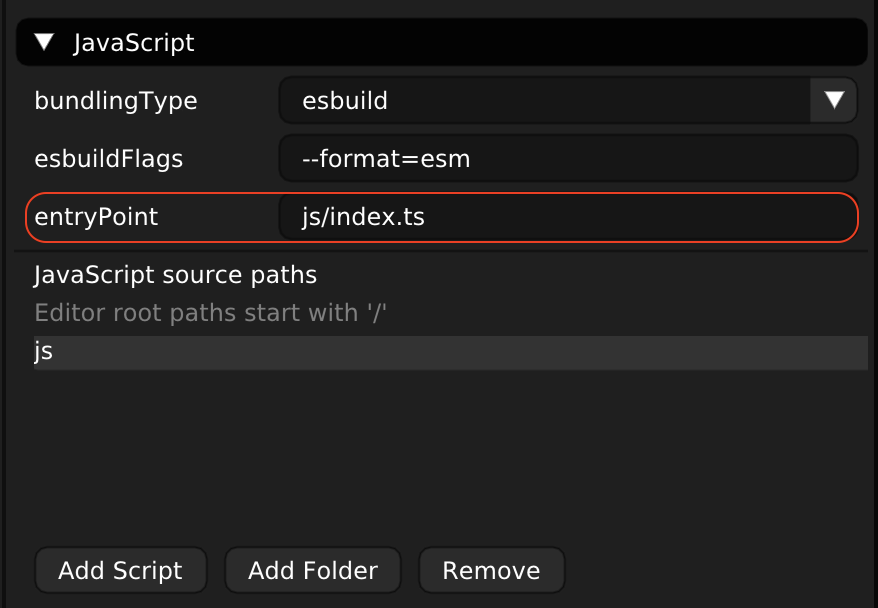
在编写第一个组件之前,打开 视图 > 项目设置。面板将显示在右侧。
将 项目设置 > 脚本 > 入口点 选项从 js/index.js 更新为 js/index.ts。
您正在寻找的设置在这里以红色标出:
现在您可以开始使用 .ts 扩展名编写组件了。
装饰器
使用 TypeScript 时,通过 Property 导出创建属性会导致代码重复:
import {Component, Property} from '@wonderlandengine/api';

class MyComponent extends MyComponent {
    static TypeName = 'my-component';
    static Properties = {
        myFloat: Property.float(1.0),
        myBool: Property.bool(true),
    };

    myFloat!: number;
    myBool!: boolean;
}
每个属性必须出现两次,一次用于类型声明,一次用于定义。装饰器可以帮助解决这一问题:
import {Component} from '@wonderlandengine/api';
/* 注意导入语句末尾的 '.js'。*/
import {property} from '@wonderlandengine/api/decorators.js';

class MyComponent extends MyComponent {
    static TypeName = 'my-component';

    @property.float(1.0)
    myFloat!: number;

    @property.bool(true)
    myBool!: boolean;
}
在类中使用 非空断言操作符 外, 您还可以使用虚拟值:
class MyComponent extends MyComponent {
    static TypeName = 'my-component';

    @property.float(1.0)
    myFloat: number = 1.0;

    @property.bool(true)
    myBool: boolean = true;
}
在上面的例子中,注意定义 myFloat 或 myBool 时省略了 !。